Học hỏi chính là kinh nghiệm. Những thứ khác chỉ là thông tin.
Albert Einstein
1. Mở đầu
Kịch bản là bạn muốn build ra 2 page là tên là rate.html và trade.html trong cùng một project sử dụng create-react-app.
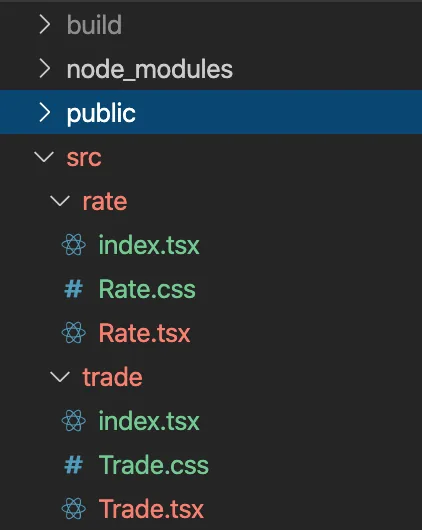
Bình thường bạn sẽ phải tạo ra 2 project riêng biệt nhưng bài này sẽ hướng dẫn cách cấu hình webpack để chỉ cần sử dụng 1 project cho cả 2 trang.
Mục tiêu đặt ra là:
- Không sử dụng
npm run eject - Sử dụng được webpackDevServer cho cả 2 page
2. Cách làm
Để sử dụng nhiều entry point trong cùng một project, bạn cần phải tuỳ biến cấu hình của webpack nhưng mặc định của CRA (create-react-app) là file webpack.config.js bị ẩn đi nếu như bạn không sử dụng eject .
Cấu hình dưới đây sử dụng "react-scripts": "3.4.0"
- Đầu tiên, để không phải
ejectCRA, bạn cần sử dụng react-app-rewired
yarn add -D react-app-rewired
- File
myapp/public/trade.html:
<!DOCTYPE html>
<html lang="en">
  <head>
    <title>Trade Page</title>
  </head>
  <body>
    <div id="trade"></div>
  </body>
</html>
- File
myapp/public/rate.html:
<!DOCTYPE html>
<html lang="en">
  <head>
    <title>Rate Page</title>
  </head>
  <body>
    <div id="rate"></div>
  </body>
</html>
- File
myapp/src/trade/index.tsx:
import React from "react";
import ReactDOM from "react-dom";
import * as serviceWorker from "../serviceWorker";
import Trade from "./Trade";

ReactDOM.render(<Trade />, document.getElementById("trade"));

// If you want your app to work offline and load faster, you can change
// unregister() to register() below. Note this comes with some pitfalls.
// Learn more about service workers: https://bit.ly/CRA-PWA
serviceWorker.unregister();
- File
myapp/src/trade/Trade.tsx:
import React from "react";
import "./Trade.css";

function Trade() {
  return (
    <div className="Trade">
      This is Trade Page
    </div>
  );
}

export default Trade;
- File
myapp/src/rate/index.tsx:
import React from "react";
import ReactDOM from "react-dom";
import * as serviceWorker from "../serviceWorker";
import Rate from "./Rate";

ReactDOM.render(<Rate />, document.getElementById("rate"));

// If you want your app to work offline and load faster, you can change
// unregister() to register() below. Note this comes with some pitfalls.
// Learn more about service workers: https://bit.ly/CRA-PWA
serviceWorker.unregister();
- File
myapp/src/rate/Rate.tsx:
import React from "react";
import "./Rate.css";

function Rate() {
  return (
    <div className="Rate">
      This is Rate Page
    </div>
  );
}

export default Rate;
- Tạo file
config-overrides.jschính là file để tuỳ biến cấu hình webpack của CRA. Và cấu hình như sau:
// myapp/config_overrides.js

/* global require, __dirname, process */
const path = require("path");
const HtmlWebpackPlugin = require("html-webpack-plugin");
const ManifestPlugin = require("webpack-manifest-plugin");

const getPublicUrlOrPath = require("react-dev-utils/getPublicUrlOrPath");
const appPackagePath = path.resolve(__dirname, "package.json");
const appPackageJson = require(appPackagePath);
const appBuild = path.resolve(__dirname, "./build/");
const appSrc = path.resolve(__dirname, "src/");
const publicUrlOrPath = getPublicUrlOrPath(
  process.env.NODE_ENV === "development",
  require(appPackagePath).homepage,
  process.env.PUBLIC_URL
);

module.exports = {
  // The Webpack config to use when compiling your react app for development or production.
  webpack: function(config, env) {
    const isEnvDevelopment = env === "development";
    const isEnvProduction = env === "production";

    config.entry = {
      trade: [
        isEnvDevelopment &&
          require.resolve("react-dev-utils/webpackHotDevClient"),
        path.resolve(__dirname, "src/trade/index.tsx")
      ].filter(Boolean),
      rate: [
        isEnvDevelopment &&
          require.resolve("react-dev-utils/webpackHotDevClient"),
        path.resolve(__dirname, "src/rate/index.tsx")
      ].filter(Boolean)
    };

    config.output = {
      path: isEnvProduction ? appBuild : undefined,
      pathinfo: isEnvDevelopment,
      filename: isEnvProduction
        ? "static/js/[name].[contenthash:8].js"
        : isEnvDevelopment && "static/js/[name].bundle.js",
      futureEmitAssets: true,
      chunkFilename: isEnvProduction
        ? "static/js/[name].[contenthash:8].chunk.js"
        : isEnvDevelopment && "static/js/[name].chunk.js",
      publicPath: publicUrlOrPath,
      devtoolModuleFilenameTemplate: isEnvProduction
        ? info =>
            path.relative(appSrc, info.absoluteResourcePath).replace(/\\/g, "/")
        : isEnvDevelopment &&
          (info => path.resolve(info.absoluteResourcePath).replace(/\\/g, "/")),
      jsonpFunction: `webpackJsonp${appPackageJson.name}`,
      globalObject: "this"
    };

    // NOTE: it is necessary to remove default ManifestPlugin
    config.plugins = config.plugins.filter(
      p => !/ManifestPlugin/.test(p.constructor)
    );

    config.plugins = [
      ...config.plugins,
      new HtmlWebpackPlugin({
        inject: true,
        chunks: ["trade"],
        template: path.resolve(__dirname, "public/trade.html"),
        filename: "trade.html"
      }),
      new HtmlWebpackPlugin({
        inject: true,
        chunks: ["rate"],
        template: path.resolve(__dirname, "public/rate.html"),
        filename: "rate.html"
      }),
      new ManifestPlugin({
        fileName: "asset-manifest.json",
        publicPath: publicUrlOrPath,
        generate: (seed, files, entrypoints) => {
          const manifestFiles = files.reduce((manifest, file) => {
            manifest[file.name] = file.path;
            return manifest;
          }, seed);

          const entrypointFiles = {};
          Object.keys(entrypoints).forEach(entrypoint => {
            entrypointFiles[entrypoint] = entrypoints[entrypoint].filter(
              fileName => !fileName.endsWith(".map")
            );
          });

          return {
            files: manifestFiles,
            entrypoints: entrypointFiles
          };
        }
      })
    ];
    return config;
  },

  devServer: function(configFunction) {
    return function(proxy, allowedHost) {
      const config = configFunction(proxy, allowedHost);
      config.historyApiFallback = {
        disableDotRule: true,
        rewrites: [
          { from: /^\/trade.html/, to: "/build/trade.html" },
          { from: /^\/rate.html/, to: "/build/rate.html" }
        ]
      };
      return config;
    };
  }
};
Chú ý: Cấu hình config-overrides.js ở trên dành cho React có version 16.12.0, nếu bạn sử dụng version khác có thể cấu hình trên sẽ không hoạt động. Bạn nên tạo 2 project, một cái đã eject và một cái sử dụng react-app-rewired để so sánh xem cần sửa ở những config nào.
- Cuối cùng, sửa scripts của file
package.json:
{
  ...
  "scripts": {
    "start": "react-app-rewired start",
    "build": "react-app-rewired build",
    "test": "react-app-rewired test",
    "eject": "react-scripts eject"
  },
  ...
}
Giờ bạn chỉ cần khởi động app yarn start và truy cập vào http://localhost:3000/trade.html hoặc http:localhost:3000/rate.html và xem kết quả.
Bạn cũng có thể xem 2 file build: build/trade.html và build/rate.html bằng lệnh yarn build .